Vector DB vs Graph DB: Choosing the Right Tool
Introduction
You’re building an AI-powered search feature. You’ve heard that you need a “vector database” — but your data is deeply interconnected, and a colleague insists you should use a “graph database” instead. Sound familiar?
The explosion of AI applications in 2025–2026 has brought two specialized database types into the spotlight: vector databases and graph databases. Both are NoSQL alternatives to traditional relational databases. Both are frequently mentioned in the context of Retrieval-Augmented Generation (RAG). Yet they solve fundamentally different problems, and choosing the wrong one can silently sabotage your application’s performance and accuracy.
In this article, you’ll learn how each database type works under the hood, what they’re optimized for, and how to decide — or whether you need both. We’ll also look at real code examples, practical use cases, and the emerging hybrid (GraphRAG) approach that combines the best of both worlds.
What you’ll walk away with:
- A clear mental model for both database types
- Decision criteria for choosing vector vs. graph vs. hybrid
- Code examples in Python for querying each
- An understanding of GraphRAG and when it’s worth the complexity
Prerequisites
- Basic familiarity with Python
- Understanding of what embeddings are (or willingness to learn as you go)
- Exposure to at least one NoSQL database concept
- (Optional) Basic graph theory concepts (nodes and edges)
Core Concept 1: Vector Databases — Similarity at Scale
How Vector Databases Work
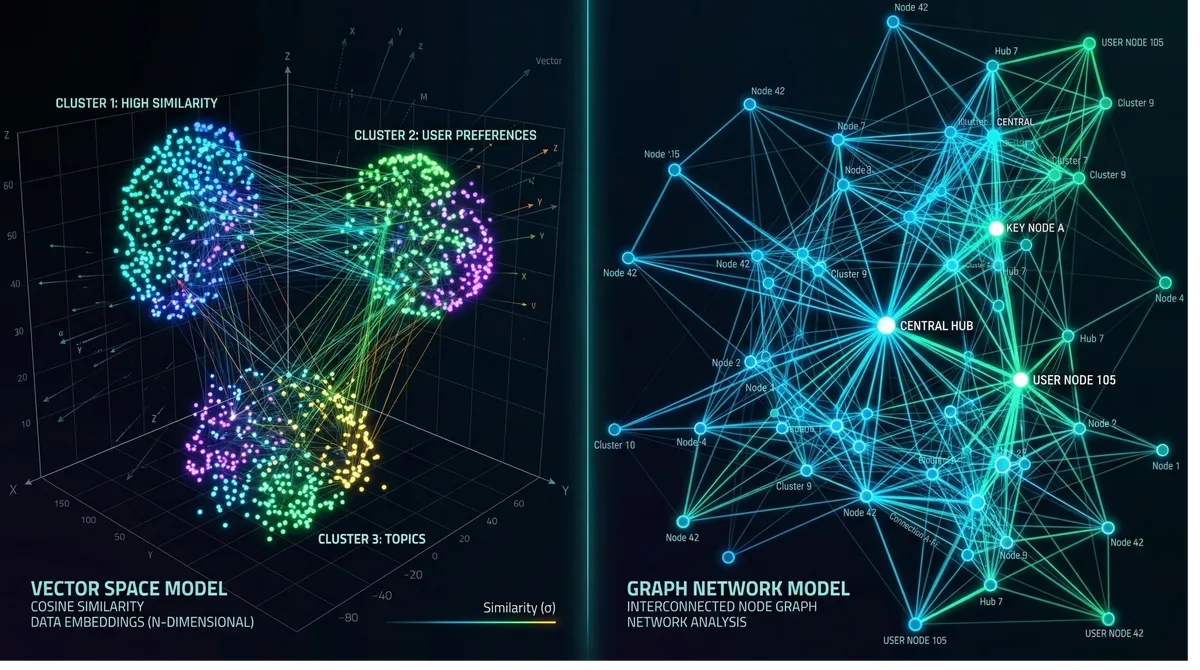
A vector database stores data as high-dimensional numerical arrays called embeddings. When you feed text, images, or audio into a machine learning model, it outputs a vector — a list of floats like [0.24, -1.3, 0.78, ...] — that encodes the semantic meaning of that data. Items that are conceptually similar end up with vectors that are geometrically close to each other in that high-dimensional space.
When you query a vector database, you don’t ask “give me rows where title = 'machine learning'". You ask “give me the 10 items most similar to this query embedding.” The database uses approximate nearest neighbor (ANN) algorithms to find them fast, even across billions of entries.
The dominant indexing algorithm is HNSW (Hierarchical Navigable Small World), which builds a multi-layer graph where each vector node connects to its nearest neighbors. Queries traverse this graph top-down, converging on the closest matches in sub-millisecond time. An alternative, IVF (Inverted File Index), partitions the space into clusters and is more memory-efficient at the cost of some recall accuracy.
Popular Vector Database Tools (2025–2026)
| Tool | Type | Best For |
|---|---|---|
| Pinecone | Managed cloud | Zero-ops production deployments |
| Weaviate | Open-source | Hybrid search + built-in vectorization |
| Milvus | Open-source | Enterprise high-throughput workloads |
| Qdrant | Open-source | Lightweight, developer-friendly, real-time |
| pgvector | PostgreSQL extension | Teams already on Postgres |
| LanceDB | Embedded/file-based | Per-user isolated stores, minimal ops |
Python Example: Semantic Search with Qdrant
# pip install qdrant-client openai sentence-transformers
from qdrant_client import QdrantClient
from qdrant_client.models import Distance, VectorParams, PointStruct
from sentence_transformers import SentenceTransformer

# Initialize
client = QdrantClient(":memory:")  # or host="localhost", port=6333
model = SentenceTransformer("all-MiniLM-L6-v2")  # 384-dimension model

# Create a collection
client.create_collection(
    collection_name="articles",
    vectors_config=VectorParams(size=384, distance=Distance.COSINE),
)

# Insert documents with their embeddings
docs = [
    "Gradient descent optimizes neural network weights",
    "Bitcoin uses proof-of-work consensus",
    "Transformers use attention mechanisms for NLP",
    "Ethereum supports smart contracts",
]

points = [
    PointStruct(
        id=i,
        vector=model.encode(doc).tolist(),
        payload={"text": doc}
    )
    for i, doc in enumerate(docs)
]
client.upsert(collection_name="articles", points=points)

# Semantic search — "AI model training" will match ML-related docs
query = "how do AI models learn?"
query_vector = model.encode(query).tolist()

results = client.search(
    collection_name="articles",
    query_vector=query_vector,
    limit=2,
)

for r in results:
    print(f"Score: {r.score:.3f} | Text: {r.payload['text']}")

# Expected output:
# Score: 0.621 | Text: Gradient descent optimizes neural network weights
# Score: 0.589 | Text: Transformers use attention mechanisms for NLP
Notice that the query “how do AI models learn?” matched ML-related documents without any keyword overlap. That’s the core power of vector search.
Core Concept 2: Graph Databases — Relationships as First-Class Citizens
How Graph Databases Work
A graph database stores data as nodes (entities) and edges (relationships between entities), along with properties on each. Unlike relational databases that represent relationships through foreign keys and JOINs, graph databases store relationships as direct pointers — making traversal extremely fast even across deeply nested connections.
Think of a graph database like a mind map. Each circle is a node (a Person, Product, Transaction), and each line connecting two circles is a labeled edge (FRIEND_OF, PURCHASED, TRANSFERRED_TO). Querying “find all friends-of-friends of Alice who also bought Product X” is a natural graph traversal — not a multi-table JOIN nightmare.
The most widely used query language for graph databases is Cypher (used by Neo4j), and the most capable open-source tool is Neo4j. Other notable options include Amazon Neptune, ArangoDB, and the embedded Kùzu.
Python Example: Fraud Detection with Neo4j
# pip install neo4j
from neo4j import GraphDatabase

URI = "bolt://localhost:7687"
driver = GraphDatabase.driver(URI, auth=("neo4j", "password"))

def create_transaction_graph(tx):
    # Create accounts and transactions
    tx.run("""
        CREATE (a:Account {id: 'A001', name: 'Alice'})
        CREATE (b:Account {id: 'A002', name: 'Bob'})
        CREATE (c:Account {id: 'A003', name: 'Charlie'})
        CREATE (d:Account {id: 'A004', name: 'Dave'})
        CREATE (a)-[:TRANSFERRED {amount: 5000, date: '2026-01-10'}]->(b)
        CREATE (b)-[:TRANSFERRED {amount: 4800, date: '2026-01-10'}]->(c)
        CREATE (c)-[:TRANSFERRED {amount: 4600, date: '2026-01-11'}]->(d)
    """)

def find_suspicious_chains(tx, min_amount=4000, max_hops=3):
    # Find rapid multi-hop money flows (classic fraud ring pattern)
    result = tx.run("""
        MATCH path = (start:Account)-[:TRANSFERRED*1..3]->(end:Account)
        WHERE ALL(r IN relationships(path) WHERE r.amount > $min_amount)
        AND start <> end
        RETURN
            [n IN nodes(path) | n.name] AS accounts,
            length(path) AS hops,
            [r IN relationships(path) | r.amount] AS amounts
        ORDER BY hops DESC
    """, min_amount=min_amount)
    return result.data()

with driver.session() as session:
    session.execute_write(create_transaction_graph)
    chains = session.execute_read(find_suspicious_chains)
    for chain in chains:
        print(f"Chain: {' -> '.join(chain['accounts'])}")
        print(f"  Hops: {chain['hops']}, Amounts: {chain['amounts']}")

# Output:
# Chain: Alice -> Bob -> Charlie -> Dave
#   Hops: 3, Amounts: [5000, 4800, 4600]
This query is nearly impossible to write efficiently in SQL across 3+ hops. In a graph database, it’s a natural traversal — and it runs fast even on large, complex networks.
Core Concept 3: Key Differences Side by Side
| Dimension | Vector Database | Graph Database |
|---|---|---|
| Data model | High-dimensional float arrays | Nodes, edges, and properties |
| Core question | ”What is most similar to this?" | "How are these entities connected?” |
| Query type | k-NN / ANN similarity search | Graph traversal (multi-hop) |
| Strengths | Semantic search, unstructured data | Complex relationships, network analysis |
| Scalability | Excellent (distributed ANN indexes) | Challenging at massive scale |
| Schema | Flexible (vector + metadata) | Schema-flexible (nodes/edges/properties) |
| Learning curve | Moderate (embeddings required) | Moderate–steep (graph modeling) |
| Typical latency | Sub-millisecond to a few ms | Fast for local traversals, slower for deep hops |
Practical Implementation Guide
When to Choose a Vector Database
Reach for a vector database when:
- Your data is unstructured (text, images, audio, video)
- You need semantic / similarity search (“find things like this”)
- You’re building a RAG pipeline for an LLM
- Your use case is recommendation (content, products, people)
- You have no inherent graph structure in your data
Concrete scenarios: semantic document search, AI chatbot memory, image similarity engines, duplicate detection, personalized feeds.
When to Choose a Graph Database
Reach for a graph database when:
- Your data is inherently relational (social networks, supply chains, org charts)
- You need multi-hop traversal (“friends of friends”, “3-degree supplier chains”)
- The query is about how things are connected, not how similar they are
- You need explainability — you want to show why a result was returned
- Use cases: fraud detection, knowledge graphs, identity resolution, logistics
Decision Flowchart
Advanced Topic: Hybrid GraphRAG
The most exciting development in 2025–2026 is the convergence of both approaches in GraphRAG (Graph + RAG) architectures. The pattern is simple and powerful:
- Vectors cast the semantic net — find all conceptually relevant candidates using ANN search
- The graph grounds the results — traverse relationships to add context, verify connections, and support multi-hop reasoning
A concrete medical example illustrates why this matters: if a user asks “Which patients with similar symptoms to Mark responded well to treatment X?”, a pure vector search can find patients with similar symptom descriptions, but it can’t trace relationships between patients, treatments, and outcomes. A pure graph query can traverse those relationships but won’t understand the semantic similarity in symptom descriptions. The hybrid approach does both.
Simple GraphRAG Pipeline
# Conceptual GraphRAG pipeline
# pip install qdrant-client sentence-transformers neo4j

from qdrant_client import QdrantClient
from sentence_transformers import SentenceTransformer
from neo4j import GraphDatabase

class GraphRAGPipeline:
    def __init__(self):
        self.vector_client = QdrantClient(":memory:")
        self.graph_driver = GraphDatabase.driver(
            "bolt://localhost:7687", auth=("neo4j", "password")
        )
        self.encoder = SentenceTransformer("all-MiniLM-L6-v2")

    def retrieve(self, query: str, top_k: int = 5) -> list[dict]:
        # Step 1: Vector search — cast semantic net
        query_vec = self.encoder.encode(query).tolist()
        candidates = self.vector_client.search(
            collection_name="documents",
            query_vector=query_vec,
            limit=top_k,
        )
        entity_ids = [c.payload["entity_id"] for c in candidates]

        # Step 2: Graph traversal — enrich with relationships
        with self.graph_driver.session() as session:
            result = session.run("""
                MATCH (e:Entity)-[r]-(related:Entity)
                WHERE e.id IN $ids
                RETURN e.id AS source, type(r) AS rel, related.name AS target
                LIMIT 20
            """, ids=entity_ids)
            graph_context = result.data()

        return {
            "semantic_matches": [c.payload for c in candidates],
            "graph_context": graph_context,
        }
Real-world GraphRAG stacks (2026):
- LanceDB + Kùzu — file-based, great for per-user isolation with minimal ops
- pgvector + Neo4j — for teams on Postgres wanting enterprise-grade graph capabilities
- Qdrant Cloud + Neo4j — managed vector + managed graph for production
- Weaviate — a single tool with built-in hybrid search (vector + GraphQL)
Common Pitfalls and Troubleshooting
Pitfall 1: Using a vector database when you need relationship queries Vector databases are terrible at answering “how is A connected to B?” Adding metadata filters helps, but deeply relational queries belong in a graph database. If you find yourself doing multiple vector queries and manually joining results, step back and consider a graph.
Pitfall 2: Choosing a graph database for unstructured semantic search Graph databases store and query structured relationships, not unstructured meaning. You can’t ask a graph DB “find documents semantically similar to this sentence” — that’s exactly what vectors are for. Some graph databases (Neo4j, Weaviate) are adding vector capabilities, but a dedicated vector DB will outperform them at scale.
Pitfall 3: Embedding quality determines vector search quality
The entire value of a vector database depends on the quality of your embeddings. Using a generic model for a specialized domain (e.g., legal text, medical records) will yield poor results. Always evaluate embedding models on domain-specific data. all-MiniLM-L6-v2 is a solid general-purpose choice; for code, consider CodeBERT or OpenAI’s text-embedding-3-small.
Pitfall 4: Graph database scalability surprises
Graph traversals that span millions of nodes can become slow without careful schema design and query optimization. In Neo4j, always index the properties you filter on, limit hop depth explicitly ([:TRANSFERRED*1..3]), and avoid unbounded traversals in production.
Pitfall 5: Jumping to hybrid too early GraphRAG adds significant complexity — you now manage two database systems, two query paradigms, and a pipeline that stitches them together. Start with the simpler tool that fits your primary use case. Only add the second when you hit a concrete limitation.
Conclusion
Vector databases and graph databases are both powerful tools — but for different jobs.
Choose a vector database when your core problem is semantic similarity: finding documents, products, or entities that mean similar things, regardless of exact keywords. Tools like Qdrant, Pinecone, and Weaviate excel here.
Choose a graph database when your core problem is relationship traversal: understanding how entities are connected, tracing multi-hop paths, and querying network patterns. Neo4j and Kùzu are the go-to options.
Consider a hybrid GraphRAG architecture when you need both — semantic recall to find relevant candidates and relationship context to reason about them. This pattern is becoming the standard for production enterprise RAG systems in 2026.
The key question to ask yourself: “Is my query asking ‘what is similar to X?’ or ‘how are X and Y connected?’” Your answer will point you to the right tool.
Next steps:
- Try Qdrant’s quickstart to get a vector database running locally in 5 minutes
- Work through Neo4j’s graph data modeling fundamentals to understand how to think in graphs
- Explore Microsoft’s GraphRAG library for a production-grade hybrid implementation
References:
- PuppyGraph — Vector Database vs Graph Database: Key Differences — https://www.puppygraph.com/blog/vector-database-vs-graph-database — Core conceptual differences and data model comparison
- Airbyte — Vector Database Vs. Graph Database: 6 Key Differences — https://airbyte.com/data-engineering-resources/vector-database-vs-graph-database — Hybrid architecture trends and 2025 tool landscape
- Cognee — Vectors and Graphs in Practice — https://www.cognee.ai/blog/fundamentals/vectors-and-graphs-in-practice — Practical GraphRAG stack recommendations (LanceDB, Kùzu, Qdrant)
- Memgraph — Why HybridRAG? — https://memgraph.com/blog/why-hybridrag — HybridRAG pattern and medical use case (Cedars-Sinai AlzKB)
- Meilisearch — GraphRAG vs Vector RAG: Side-by-side comparison — https://www.meilisearch.com/blog/graph-rag-vs-vector-rag — Scalability and production architecture guidance