DevSecOps Best Practices for 2026
Introduction
Imagine shipping a new feature on a Friday afternoon, only to get paged Saturday morning because a critical vulnerability in a transitive dependency was silently pulled into your container image during the build. Your security team finds out when a customer tweets about it. Sound familiar? This is the reality for teams that still treat security as a gate at the end of the pipeline rather than a built-in property of the pipeline itself.
DevSecOps addresses this by extending the DevOps philosophy—fast feedback, automation, shared ownership—to include security as a first-class concern at every stage of the software development lifecycle (SDLC). Rather than relying on a dedicated security team to review code once a quarter, DevSecOps puts lightweight, automated security checks in the hands of developers the moment they write a line of code.
In this article you’ll learn the core principles behind DevSecOps, how to instrument a real CI/CD pipeline with the most effective open-source security tools available in 2026, and how to build the cultural habits that make security sustainable. Prerequisites are a basic familiarity with CI/CD concepts (GitHub Actions or equivalent), Docker, and the command line. No deep security background is required.
Prerequisites
- Familiarity with Git and a CI/CD platform (GitHub Actions examples are used throughout)
- A working knowledge of Docker and container images
- Basic YAML syntax for pipeline configuration
- (Optional) A cloud account for deploying workloads and testing runtime scanning
What Is DevSecOps and Why Does It Matter in 2026?
DevSecOps stands for Development, Security, and Operations. It integrates security into every phase of the SDLC, from design and coding through deployment and runtime monitoring. The guiding principle is often called shift left: move security checks earlier, to where fixing issues is cheapest and fastest.
The business case has never been clearer. The DevSecOps market in 2026 is valued between $8.6 billion and $10.9 billion, driven by cloud-native architectures, regulatory pressure (the EU Cyber Resilience Act entered enforcement in late 2025/2026), and the explosion of AI-assisted coding that introduces new, hard-to-review code at scale. Meanwhile, software supply chain attacks surged dramatically in recent years, and the average cost of a data breach hit $4.88 million in 2024—the highest on record.
Yet adoption remains uneven. Only 36% of organizations actively practice DevSecOps today, and among those, many still treat scanning as a checkbox rather than an engineering discipline. The gap between teams that succeed and those that struggle is rarely tooling; it is culture, automation depth, and ownership clarity.
Core Principle 1: Shift Left—Catch Bugs Where They’re Cheapest to Fix
The traditional model places security testing near the end of the SDLC, after code is written, tested for functionality, and packaged for release. A critical vulnerability caught at this stage can mean days of rework and a delayed release. The same issue caught at the commit stage takes minutes to fix.
Shift-left security means embedding checks into the developer’s local workflow and into the earliest pipeline stages:
- Pre-commit hooks run secret scanning and basic linting before a commit even reaches the server.
- Pull-request gates run SAST and dependency scanning on every proposed change.
- Build-stage scanning tests the compiled artifact and container image before it reaches any environment.
A minimal pre-commit setup using detect-secrets and Gitleaks looks like this:
# .pre-commit-config.yaml
repos:
  - repo: https://github.com/Yelp/detect-secrets
    rev: v1.4.0
    hooks:
      - id: detect-secrets
        args: ["--baseline", ".secrets.baseline"]

  - repo: https://github.com/gitleaks/gitleaks
    rev: v8.18.4
    hooks:
      - id: gitleaks
Install it once per developer machine with pre-commit install. Every git commit now runs these checks automatically—no pipeline time wasted, no secrets accidentally pushed.
Core Principle 2: Automate Security in the CI/CD Pipeline
Manual security reviews do not scale. A team shipping twenty pull requests a day cannot have a human review each one for injection flaws, dependency vulnerabilities, and misconfigured IAM roles. Automation is the force multiplier that makes DevSecOps practical.
The four main automated scan types to integrate are:
| Type | What it scans | Example tools |
|---|---|---|
| SAST (Static Application Security Testing) | Source code at rest | Semgrep, SonarQube, CodeQL |
| SCA (Software Composition Analysis) | Third-party dependencies & licenses | Snyk, Trivy, Dependabot |
| Container scanning | OS packages & layers inside images | Trivy, Grype, Anchore |
| IaC scanning | Terraform, Helm, Kubernetes manifests | Checkov, tfsec, kube-linter |
Here is a production-ready GitHub Actions workflow that combines all four:
# .github/workflows/devsecops.yml
name: DevSecOps Pipeline

on:
  push:
    branches: [main]
  pull_request:
    branches: [main]

jobs:
  # --- SAST: Static code analysis ---
  sast:
    name: Semgrep SAST
    runs-on: ubuntu-latest
    steps:
      - uses: actions/checkout@v4
      - uses: returntocorp/semgrep-action@v1
        with:
          config: "auto"       # auto-detects language rulesets
          output: semgrep.sarif
      - uses: github/codeql-action/upload-sarif@v3
        with:
          sarif_file: semgrep.sarif

  # --- SCA: Dependency vulnerability scan ---
  sca:
    name: Trivy Dependency Scan
    runs-on: ubuntu-latest
    steps:
      - uses: actions/checkout@v4
      - name: Run Trivy filesystem scan
        uses: aquasecurity/[email protected]
        with:
          scan-type: fs
          scan-ref: .
          format: sarif
          output: trivy-fs.sarif
          exit-code: 1           # fail pipeline on CRITICAL findings
          severity: CRITICAL,HIGH
      - uses: github/codeql-action/upload-sarif@v3
        if: always()
        with:
          sarif_file: trivy-fs.sarif

  # --- Container scan ---
  container_scan:
    name: Trivy Container Scan
    runs-on: ubuntu-latest
    needs: sca
    steps:
      - uses: actions/checkout@v4
      - name: Build image
        run: docker build -t myapp:${{ github.sha }} .
      - name: Scan image
        uses: aquasecurity/[email protected]
        with:
          scan-type: image
          image-ref: myapp:${{ github.sha }}
          format: sarif
          output: trivy-image.sarif
          exit-code: 1
          severity: CRITICAL,HIGH
      - uses: github/codeql-action/upload-sarif@v3
        if: always()
        with:
          sarif_file: trivy-image.sarif

  # --- IaC scan ---
  iac:
    name: Checkov IaC Scan
    runs-on: ubuntu-latest
    steps:
      - uses: actions/checkout@v4
      - name: Run Checkov
        uses: bridgecrewio/checkov-action@v12
        with:
          directory: ./infra        # path to Terraform/Helm/K8s manifests
          framework: terraform,kubernetes
          soft_fail: false
          output_format: sarif
          output_file_path: checkov.sarif
      - uses: github/codeql-action/upload-sarif@v3
        if: always()
        with:
          sarif_file: checkov.sarif
All SARIF outputs feed directly into GitHub’s Security tab, giving developers a single pane of glass for findings without ever leaving their existing workflow.
Core Principle 3: Secure the Software Supply Chain
One of the fastest-growing attack surfaces in 2026 is not your code—it is the code your code depends on. Supply chain attacks have risen sharply in recent years, targeting open-source libraries, build systems, and CI/CD pipelines themselves.
Three practices form the baseline:
Software Bill of Materials (SBOM)
An SBOM is a machine-readable inventory of every component—direct and transitive—in your software. Federal agencies (via EO 14028) and EU vendors (via the CRA) are now required to produce and share SBOMs. Even if you are not regulated, having an SBOM means you can answer “are we affected?” in minutes when a new CVE drops.
Generate one automatically in your pipeline using Syft:
# Install Syft (v1.x)
curl -sSfL https://raw.githubusercontent.com/anchore/syft/main/install.sh | sh -s -- -b /usr/local/bin

# Generate CycloneDX SBOM for a container image
syft myapp:latest -o cyclonedx-json > sbom.json

# Or for a filesystem/project directory
syft dir:. -o spdx-json > sbom-source.json
Store the SBOM as a pipeline artifact alongside each build. When CVE-2025-XXXX is announced next week, you can grep your SBOMs instead of manually auditing repositories.
Artifact Signing with Sigstore / Cosign
Signing container images proves that they came from your pipeline and were not tampered with in transit. Cosign makes this straightforward:
# Install cosign v2
brew install cosign   # macOS
# or: https://github.com/sigstore/cosign/releases

# Sign an image after pushing to a registry
cosign sign --yes ghcr.io/myorg/myapp:$GIT_SHA

# Verify before deploying
cosign verify \
  --certificate-identity "https://github.com/myorg/myrepo/.github/workflows/release.yml@refs/heads/main" \
  --certificate-oidc-issuer "https://token.actions.githubusercontent.com" \
  ghcr.io/myorg/myapp:$GIT_SHA
Pair this with a policy engine like OPA/Gatekeeper in Kubernetes to reject unsigned images at admission time.
Dependency Pinning
Broad version ranges like ^4.0.0 or * mean your build can silently pull in a compromised patch release. Pin all direct dependencies to exact versions and use a lockfile (package-lock.json, poetry.lock, go.sum). Use Renovate Bot or Dependabot to automate version bumps with automated PR tests.
Core Principle 4: Policy as Code and Secrets Management
Hard-coded credentials are the single most preventable cause of cloud breaches. Never pass secrets via environment variables baked into images. Instead:
- Store secrets in a secrets manager (HashiCorp Vault, AWS Secrets Manager, GCP Secret Manager).
- Inject them at runtime via the orchestration layer (Kubernetes Secrets synced from Vault via the External Secrets Operator).
- Rotate them automatically on a defined schedule.
For enforcing security policies uniformly—across Kubernetes, Terraform, and CI/CD—use Open Policy Agent (OPA) with policies written in Rego:
# policy/deny_privileged_containers.rego
package kubernetes.admission

deny[msg] {
  input.request.kind.kind == "Pod"
  container := input.request.object.spec.containers[_]
  container.securityContext.privileged == true
  msg := sprintf("Privileged container '%v' is not allowed.", [container.name])
}
This policy runs as an admission webhook, blocking any privileged container from ever being scheduled in production—no human review required.
Core Principle 5: Continuous Monitoring and Incident Response
Shifting left is necessary but not sufficient. Attackers who get past your pipeline controls should face runtime defenses that detect and respond automatically.
A minimal runtime monitoring stack includes:
- SIEM integration — ship container and application logs to a central platform (Elastic, Splunk, or the cloud-native equivalent). Alert on anomalous patterns.
- CSPM (Cloud Security Posture Management) — continuously compare your cloud configuration against CIS benchmarks. Wiz, Orca, and Prisma Cloud are common choices; open-source alternatives include Prowler and ScoutSuite.
- Falco — an eBPF-based runtime threat detection engine for Kubernetes. It fires alerts when a container opens a shell, reads
/etc/shadow, or makes an unexpected outbound connection.
A simple Falco rule to detect shell spawning inside containers:
# falco_rules.yaml
- rule: Shell Spawned in Container
  desc: Detect a shell being spawned inside any container
  condition: >
    spawned_process
    and container
    and proc.name in (shell_binaries)
  output: >
    Shell spawned (user=%user.name container=%container.name
    image=%container.image.repository cmd=%proc.cmdline)
  priority: WARNING
  tags: [container, shell, mitre_execution]
Pair Falco with a webhook to your incident response tool (PagerDuty, OpsGenie) and you have automated detection-to-alert in under a minute.
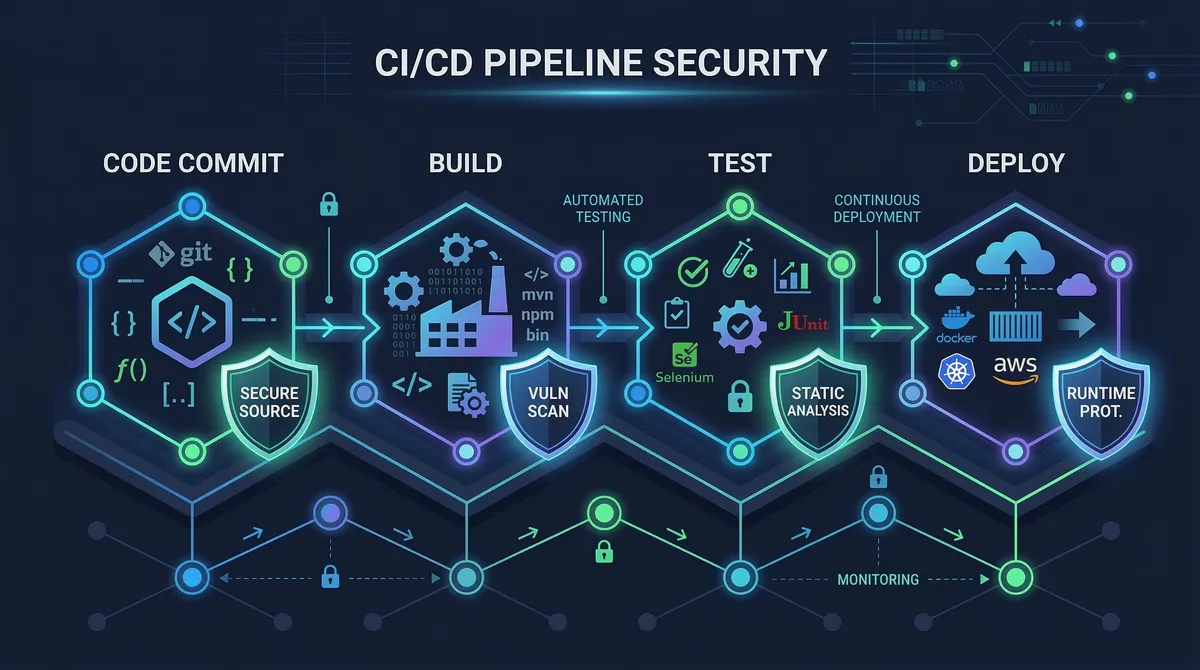
DevSecOps Pipeline Architecture
Here is how these layers compose into a complete pipeline:
Each gate is a hard failure: the pipeline stops and the developer gets actionable feedback rather than a vague report three weeks later.
Advanced: AI-Generated Code and the New 2026 Threat Surface
AI coding assistants (GitHub Copilot, Cursor, Claude) have changed the velocity of code production but not the security requirements on that code. Several new risks have emerged:
- AI-generated code may introduce subtle logical flaws not caught by pattern-matching SAST rules, because the patterns do not exist yet. Complement SAST with manual threat modeling for critical code paths.
- Prompt injection is now the top-ranked vulnerability in the OWASP LLM Top 10 (2025), affecting any system that passes user input into an LLM context. Treat LLM output like user input—validate and sanitize.
- Shadow AI / data exfiltration — developers pasting proprietary source code into public AI services is a rising data-loss vector. Enforce a policy (technical or organizational) on approved AI tool usage and log it.
- AI agents in CI/CD — agentic AI workflows that autonomously open PRs, run commands, and deploy changes need the same RBAC and audit-trail rigor as human operators. Every action should be traceable to an identity with a minimum necessary permission scope.
Common Pitfalls and Troubleshooting
“Our pipeline is too slow now.”
Security tools are often blamed for slow pipelines, but the culprit is usually poor job ordering. Run SAST and dependency scans in parallel, not sequence. Use needs: in GitHub Actions only where a true data dependency exists (e.g., the container scan needs the image to be built first). Most full security suites should add less than five minutes to a well-parallelized pipeline.
“Too many false positives—developers ignore the alerts.”
Semgrep and Trivy both support severity filtering. Start with --severity CRITICAL,HIGH only. Tune rules over two to three sprints before expanding to MEDIUM. Build a triage SLA: CRITICAL findings block the PR; HIGH findings must be resolved within one sprint; MEDIUM is tracked but non-blocking. Developers will take alerts seriously when the signal-to-noise ratio is high.
“We generated an SBOM but don’t know what to do with it.”
Pair your SBOM with Grype for continuous vulnerability matching: grype sbom:./sbom.json. Run it nightly against all published SBOMs to catch newly disclosed CVEs against already-deployed versions—a critical capability that pure pipeline scanning misses.
“Our secrets scanning keeps flagging test fixture files.”
Use a .gitleaksignore file or detect-secrets baseline to allowlist known test values. Never disable scanning entirely; instead, be surgical about what you suppress, and document why.
“IaC scan failures are blocking non-security work.”
Tag IaC checks with soft_fail_on for non-critical rules during a transition period. Publish a maturity roadmap with the team: “We will enforce all HIGH IaC rules by Q3.” This creates accountability without creating paralysis.
Conclusion
DevSecOps is not a product you buy—it is a set of engineering habits layered into your existing delivery pipeline. The highest-impact practices in order of implementation effort are:
- Pre-commit hooks for secrets and basic linting (one-hour setup, immediate value).
- SAST + SCA in CI on every PR (one day, catches the majority of common vulnerabilities).
- Container scanning + SBOM generation on every build (one day, critical for supply chain visibility).
- IaC scanning tied to infrastructure repositories (one day, prevents cloud misconfigurations).
- Policy as code for Kubernetes and cloud environments (one to two sprints, scales security governance).
- Runtime monitoring with Falco and CSPM (ongoing, closes the detection gap).
The teams that succeed with DevSecOps in 2026 are not the ones with the most tools—they are the ones that have reduced friction enough that developers want to ship secure code because the feedback loop is fast, clear, and actionable. Build the pipeline, tune the noise, and cultivate shared ownership. Security becomes an accelerator, not a gatekeeper.
Next steps: Explore the OWASP DevSecOps Guideline, assess your team’s current maturity with the OWASP DSOMM, and consider obtaining a formal DevSecOps certification to deepen practical skills.
References:
- Wiz Academy — What DevSecOps Means in 2026 — https://www.wiz.io/academy/application-security/what-is-devsecops — Shift-left evolution, secure-by-default patterns, 2026 maturity framework.
- Practical DevSecOps — Top 15 DevSecOps Best Practices for 2026 — https://www.practical-devsecops.com/devsecops-best-practices/ — Best-practice checklist, market statistics, team training recommendations.
- Medium / DevOpsDynamo — Zero Trust, Zero Noise: AI-Driven DevSecOps Pipeline with GitHub Actions — https://medium.com/@DynamoDevOps — Semgrep, Trivy, Gitleaks, OPA pipeline example.
- DZone — 6 Software Development and DevOps Trends Shaping 2026 — https://dzone.com/articles/software-devops-trends-shaping-2026 — SBOM, SLSA, supply chain security trend analysis.
- Practical DevSecOps — DevSecOps Statistics 2026 — https://www.practical-devsecops.com/devsecops-statistics-2026/ — Adoption rates, market sizing, automation survey data.