Image Recognition in Python: A Complete Developer Guide
Introduction
Have you ever wondered how your smartphone recognizes faces in photos, or how self-driving cars identify pedestrians and traffic signs? The answer lies in image recognition—one of the most transformative applications of artificial intelligence today. With Python’s rich ecosystem of libraries like TensorFlow, PyTorch, and OpenCV, building sophisticated image recognition systems has become accessible to developers at all skill levels.
In this comprehensive guide, you’ll learn how to implement image recognition from scratch, understand the underlying algorithms like Convolutional Neural Networks (CNNs), and apply transfer learning to solve real-world problems. Whether you’re building a medical diagnosis tool, automating quality control in manufacturing, or creating engaging consumer applications, this article will equip you with both theoretical understanding and practical implementation skills.
By the end of this tutorial, you’ll be able to build, train, and deploy your own image recognition models—transforming raw pixels into meaningful insights.
Prerequisites
Before diving in, ensure you have:
- Python 3.8+ installed on your system
- Basic understanding of Python programming (functions, classes, loops)
- Familiarity with NumPy arrays and basic linear algebra
- Understanding of machine learning fundamentals (training, validation, testing)
- A computer with at least 8GB RAM (GPU recommended but not required)
- Basic command line/terminal knowledge
Required libraries (we’ll install these):
- TensorFlow 2.15+ or PyTorch 2.0+
- OpenCV 4.5+
- NumPy, Matplotlib, Pillow
- scikit-learn (for data preprocessing)
Understanding Image Recognition Fundamentals
Image recognition is the process of identifying and classifying objects, patterns, or features within digital images. Unlike simple image processing, image recognition involves teaching machines to “understand” visual content the way humans do.
How Image Recognition Works
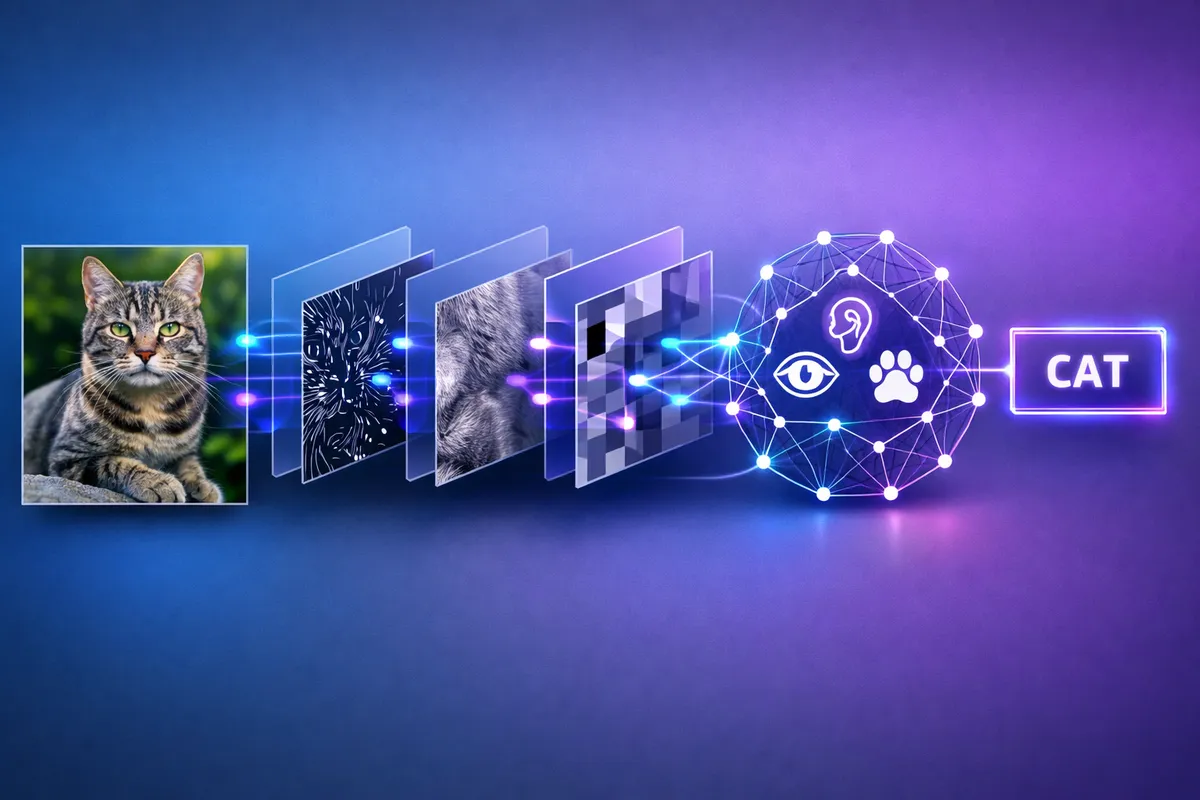
At its core, image recognition follows a systematic pipeline:
Key Components:
-
Image Preprocessing: Images are resized to consistent dimensions (typically 224x224 or 299x299 pixels), normalized to scale pixel values between 0-1, and sometimes augmented to improve model robustness.
-
Feature Extraction: Convolutional Neural Networks (CNNs) automatically learn hierarchical features—from simple edges and textures in early layers to complex objects in deeper layers.
-
Classification: Fully connected layers map extracted features to specific class labels, with a softmax function providing probability distributions across classes.
Convolutional Neural Networks (CNNs)
CNNs are the backbone of modern image recognition. They use specialized layers:
- Convolutional Layers: Apply filters that slide across images to detect patterns like edges, corners, and textures
- Pooling Layers: Reduce spatial dimensions while retaining important features (typically max pooling)
- Activation Functions: Introduce non-linearity (ReLU is most common:
f(x) = max(0, x)) - Fully Connected Layers: Connect all neurons to make final classification decisions
Setting Up Your Python Environment
Let’s get your development environment configured properly.
Installation
Create a virtual environment and install required packages:
# Create virtual environment
python -m venv image_recognition_env

# Activate it (Windows)
image_recognition_env\Scripts\activate
# Activate it (Mac/Linux)
source image_recognition_env/bin/activate

# Install core libraries
pip install tensorflow==2.15.0
pip install opencv-python==4.9.0.80
pip install pillow==10.2.0
pip install matplotlib==3.8.2
pip install numpy==1.26.3
pip install scikit-learn==1.4.0
Alternative for PyTorch users:
# Install PyTorch (CPU version)
pip install torch==2.2.0 torchvision==0.17.0

# For GPU support, visit pytorch.org for CUDA-specific commands
Verify Installation
import tensorflow as tf
import cv2
import numpy as np
from PIL import Image
import matplotlib.pyplot as plt

print(f"TensorFlow version: {tf.__version__}")
print(f"OpenCV version: {cv2.__version__}")
print(f"NumPy version: {np.__version__}")

# Check for GPU availability
print(f"GPU Available: {tf.config.list_physical_devices('GPU')}")
Building Your First Image Recognition Model
Let’s build a simple CNN from scratch to classify images from the CIFAR-10 dataset, which contains 60,000 32x32 color images in 10 classes.
Loading and Preprocessing Data
import tensorflow as tf
from tensorflow import keras
from tensorflow.keras import layers
import matplotlib.pyplot as plt
import numpy as np

# Load CIFAR-10 dataset (built into Keras)
(x_train, y_train), (x_test, y_test) = keras.datasets.cifar10.load_data()

# Class names for reference
class_names = ['airplane', 'automobile', 'bird', 'cat', 'deer',
               'dog', 'frog', 'horse', 'ship', 'truck']

# Normalize pixel values to range [0, 1]
x_train = x_train.astype('float32') / 255.0
x_test = x_test.astype('float32') / 255.0

# Convert labels to categorical (one-hot encoding)
y_train = keras.utils.to_categorical(y_train, 10)
y_test = keras.utils.to_categorical(y_test, 10)

print(f"Training data shape: {x_train.shape}")
print(f"Test data shape: {x_test.shape}")

# Visualize sample images
plt.figure(figsize=(10, 10))
for i in range(25):
    plt.subplot(5, 5, i+1)
    plt.xticks([])
    plt.yticks([])
    plt.grid(False)
    plt.imshow(x_train[i])
    plt.xlabel(class_names[np.argmax(y_train[i])])
plt.tight_layout()
plt.show()
Creating the CNN Architecture
def create_cnn_model():
    """
    Build a CNN architecture for image classification.
    Architecture: Conv -> Pool -> Conv -> Pool -> Dense -> Output
    """
    model = keras.Sequential([
        # First convolutional block
        layers.Conv2D(32, (3, 3), activation='relu',
                     input_shape=(32, 32, 3), padding='same'),
        layers.BatchNormalization(),
        layers.Conv2D(32, (3, 3), activation='relu', padding='same'),
        layers.MaxPooling2D((2, 2)),
        layers.Dropout(0.2),

        # Second convolutional block
        layers.Conv2D(64, (3, 3), activation='relu', padding='same'),
        layers.BatchNormalization(),
        layers.Conv2D(64, (3, 3), activation='relu', padding='same'),
        layers.MaxPooling2D((2, 2)),
        layers.Dropout(0.3),

        # Third convolutional block
        layers.Conv2D(128, (3, 3), activation='relu', padding='same'),
        layers.BatchNormalization(),
        layers.Conv2D(128, (3, 3), activation='relu', padding='same'),
        layers.MaxPooling2D((2, 2)),
        layers.Dropout(0.4),

        # Fully connected layers
        layers.Flatten(),
        layers.Dense(128, activation='relu'),
        layers.BatchNormalization(),
        layers.Dropout(0.5),
        layers.Dense(10, activation='softmax')  # 10 classes
    ])

    return model

# Create and compile the model
model = create_cnn_model()

model.compile(
    optimizer='adam',
    loss='categorical_crossentropy',
    metrics=['accuracy']
)

# Display model architecture
model.summary()
Training the Model
from tensorflow.keras.callbacks import EarlyStopping, ReduceLROnPlateau

# Define callbacks for better training
early_stopping = EarlyStopping(
    monitor='val_loss',
    patience=10,
    restore_best_weights=True
)

reduce_lr = ReduceLROnPlateau(
    monitor='val_loss',
    factor=0.5,
    patience=5,
    min_lr=1e-7
)

# Train the model
history = model.fit(
    x_train, y_train,
    batch_size=64,
    epochs=50,
    validation_split=0.2,
    callbacks=[early_stopping, reduce_lr],
    verbose=1
)

# Evaluate on test set
test_loss, test_accuracy = model.evaluate(x_test, y_test, verbose=0)
print(f"\nTest Accuracy: {test_accuracy*100:.2f}%")
print(f"Test Loss: {test_loss:.4f}")
Visualizing Training Progress
def plot_training_history(history):
    """Plot training and validation accuracy/loss"""
    fig, (ax1, ax2) = plt.subplots(1, 2, figsize=(14, 5))

    # Accuracy plot
    ax1.plot(history.history['accuracy'], label='Training Accuracy')
    ax1.plot(history.history['val_accuracy'], label='Validation Accuracy')
    ax1.set_title('Model Accuracy Over Epochs')
    ax1.set_xlabel('Epoch')
    ax1.set_ylabel('Accuracy')
    ax1.legend()
    ax1.grid(True)

    # Loss plot
    ax2.plot(history.history['loss'], label='Training Loss')
    ax2.plot(history.history['val_loss'], label='Validation Loss')
    ax2.set_title('Model Loss Over Epochs')
    ax2.set_xlabel('Epoch')
    ax2.set_ylabel('Loss')
    ax2.legend()
    ax2.grid(True)

    plt.tight_layout()
    plt.show()

plot_training_history(history)
Transfer Learning: Leveraging Pre-trained Models
Training a CNN from scratch requires substantial data and computational resources. Transfer learning allows you to use models pre-trained on massive datasets (like ImageNet with 14 million images) and adapt them to your specific task.
Using ResNet50 for Image Classification
from tensorflow.keras.applications import ResNet50
from tensorflow.keras.applications.resnet50 import preprocess_input, decode_predictions
from tensorflow.keras.preprocessing import image

# Load pre-trained ResNet50 (trained on ImageNet)
base_model = ResNet50(weights='imagenet', include_top=True)

def classify_image_with_resnet(img_path):
    """
    Classify an image using pre-trained ResNet50

    Args:
        img_path: Path to the image file

    Returns:
        Top 5 predictions with probabilities
    """
    # Load and preprocess image
    img = image.load_img(img_path, target_size=(224, 224))
    img_array = image.img_to_array(img)
    img_array = np.expand_dims(img_array, axis=0)
    img_array = preprocess_input(img_array)

    # Make predictions
    predictions = base_model.predict(img_array)
    decoded = decode_predictions(predictions, top=5)[0]

    print(f"\nPredictions for {img_path}:")
    for i, (imagenet_id, label, score) in enumerate(decoded, 1):
        print(f"{i}. {label}: {score*100:.2f}%")

    return decoded

# Example usage
# classify_image_with_resnet('path/to/your/image.jpg')
Fine-tuning for Custom Datasets
When you have a custom dataset, you can fine-tune a pre-trained model:
def create_transfer_learning_model(num_classes, base_model_name='ResNet50'):
    """
    Create a transfer learning model for custom classification

    Args:
        num_classes: Number of classes in your dataset
        base_model_name: Pre-trained model to use as base

    Returns:
        Compiled Keras model
    """
    # Load base model without top layers
    base_model = ResNet50(
        weights='imagenet',
        include_top=False,
        input_shape=(224, 224, 3)
    )

    # Freeze base model layers (optional - can unfreeze later)
    base_model.trainable = False

    # Add custom classification head
    model = keras.Sequential([
        base_model,
        layers.GlobalAveragePooling2D(),
        layers.Dense(256, activation='relu'),
        layers.Dropout(0.5),
        layers.Dense(num_classes, activation='softmax')
    ])

    # Compile model
    model.compile(
        optimizer=keras.optimizers.Adam(learning_rate=0.001),
        loss='categorical_crossentropy',
        metrics=['accuracy']
    )

    return model

# Create model for custom dataset with 5 classes
custom_model = create_transfer_learning_model(num_classes=5)
custom_model.summary()
Data Augmentation for Better Generalization
from tensorflow.keras.preprocessing.image import ImageDataGenerator

# Create data augmentation generator
train_datagen = ImageDataGenerator(
    rotation_range=20,
    width_shift_range=0.2,
    height_shift_range=0.2,
    horizontal_flip=True,
    zoom_range=0.2,
    shear_range=0.15,
    fill_mode='nearest',
    preprocessing_function=preprocess_input
)

# Validation data (no augmentation)
val_datagen = ImageDataGenerator(
    preprocessing_function=preprocess_input
)

# Load images from directory
# train_generator = train_datagen.flow_from_directory(
#     'path/to/train',
#     target_size=(224, 224),
#     batch_size=32,
#     class_mode='categorical'
# )
Real-World Implementation with OpenCV
OpenCV excels at real-time image processing and computer vision tasks. Let’s build a practical face detection system.
Face Detection System
import cv2
import numpy as np

class FaceDetector:
    """Real-time face detection using Haar Cascades"""

    def __init__(self):
        # Load pre-trained Haar Cascade classifier
        cascade_path = cv2.data.haarcascades + 'haarcascade_frontalface_default.xml'
        self.face_cascade = cv2.CascadeClassifier(cascade_path)

        if self.face_cascade.empty():
            raise IOError("Failed to load Haar Cascade classifier")

    def detect_faces(self, image_path):
        """
        Detect faces in an image

        Args:
            image_path: Path to input image

        Returns:
            Image with detected faces highlighted
        """
        # Read image
        img = cv2.imread(image_path)
        if img is None:
            raise ValueError(f"Could not read image: {image_path}")

        # Convert to grayscale (Haar cascades work on grayscale)
        gray = cv2.cvtColor(img, cv2.COLOR_BGR2GRAY)

        # Detect faces
        faces = self.face_cascade.detectMultiScale(
            gray,
            scaleFactor=1.1,
            minNeighbors=5,
            minSize=(30, 30)
        )

        print(f"Detected {len(faces)} face(s)")

        # Draw rectangles around faces
        for (x, y, w, h) in faces:
            cv2.rectangle(img, (x, y), (x+w, y+h), (0, 255, 0), 2)
            cv2.putText(img, 'Face', (x, y-10),
                       cv2.FONT_HERSHEY_SIMPLEX, 0.9, (0, 255, 0), 2)

        return img, faces

    def detect_faces_video(self, video_source=0):
        """
        Real-time face detection from webcam or video file

        Args:
            video_source: 0 for webcam, or path to video file
        """
        cap = cv2.VideoCapture(video_source)

        if not cap.isOpened():
            raise IOError("Cannot open video source")

        print("Press 'q' to quit")

        while True:
            ret, frame = cap.read()
            if not ret:
                break

            # Convert to grayscale
            gray = cv2.cvtColor(frame, cv2.COLOR_BGR2GRAY)

            # Detect faces
            faces = self.face_cascade.detectMultiScale(
                gray, scaleFactor=1.1, minNeighbors=5, minSize=(30, 30)
            )

            # Draw rectangles
            for (x, y, w, h) in faces:
                cv2.rectangle(frame, (x, y), (x+w, y+h), (0, 255, 0), 2)

            # Display count
            cv2.putText(frame, f'Faces: {len(faces)}', (10, 30),
                       cv2.FONT_HERSHEY_SIMPLEX, 1, (0, 255, 0), 2)

            cv2.imshow('Face Detection', frame)

            if cv2.waitKey(1) & 0xFF == ord('q'):
                break

        cap.release()
        cv2.destroyAllWindows()

# Example usage
detector = FaceDetector()
# result_img, faces = detector.detect_faces('path/to/image.jpg')
# detector.detect_faces_video()  # Use webcam
Advanced Techniques and Optimization
Handling Overfitting
Overfitting occurs when your model memorizes training data instead of learning generalizable patterns. Here’s how to combat it:
from tensorflow.keras import regularizers

def create_regularized_model(num_classes):
    """CNN with regularization techniques to prevent overfitting"""
    model = keras.Sequential([
        # L2 regularization on convolutional layers
        layers.Conv2D(32, (3, 3), activation='relu',
                     kernel_regularizer=regularizers.l2(0.001),
                     input_shape=(224, 224, 3)),
        layers.BatchNormalization(),
        layers.MaxPooling2D((2, 2)),
        layers.Dropout(0.3),  # Dropout for regularization

        layers.Conv2D(64, (3, 3), activation='relu',
                     kernel_regularizer=regularizers.l2(0.001)),
        layers.BatchNormalization(),
        layers.MaxPooling2D((2, 2)),
        layers.Dropout(0.4),

        layers.Flatten(),
        layers.Dense(128, activation='relu',
                    kernel_regularizer=regularizers.l2(0.001)),
        layers.Dropout(0.5),
        layers.Dense(num_classes, activation='softmax')
    ])

    return model
Model Evaluation and Metrics
from sklearn.metrics import classification_report, confusion_matrix
import seaborn as sns

def evaluate_model_performance(model, x_test, y_test, class_names):
    """
    Comprehensive model evaluation with metrics and visualizations
    """
    # Get predictions
    y_pred = model.predict(x_test)
    y_pred_classes = np.argmax(y_pred, axis=1)
    y_true = np.argmax(y_test, axis=1)

    # Classification report
    print("Classification Report:")
    print(classification_report(y_true, y_pred_classes,
                                target_names=class_names))

    # Confusion matrix
    cm = confusion_matrix(y_true, y_pred_classes)
    plt.figure(figsize=(10, 8))
    sns.heatmap(cm, annot=True, fmt='d', cmap='Blues',
                xticklabels=class_names, yticklabels=class_names)
    plt.title('Confusion Matrix')
    plt.ylabel('True Label')
    plt.xlabel('Predicted Label')
    plt.tight_layout()
    plt.show()

    return y_pred_classes

# Example usage
# predictions = evaluate_model_performance(model, x_test, y_test, class_names)
Model Deployment Considerations
def save_and_load_model(model, save_path='image_recognition_model.h5'):
    """
    Save trained model and demonstrate loading
    """
    # Save model
    model.save(save_path)
    print(f"Model saved to {save_path}")

    # Load model
    loaded_model = keras.models.load_model(save_path)
    print("Model loaded successfully")

    return loaded_model

def convert_to_tflite(model, tflite_path='model.tflite'):
    """
    Convert Keras model to TensorFlow Lite for mobile deployment
    """
    # Convert model
    converter = tf.lite.TFLiteConverter.from_keras_model(model)
    converter.optimizations = [tf.lite.Optimize.DEFAULT]
    tflite_model = converter.convert()

    # Save TFLite model
    with open(tflite_path, 'wb') as f:
        f.write(tflite_model)

    print(f"TFLite model saved to {tflite_path}")
    print(f"Model size: {len(tflite_model) / 1024:.2f} KB")
Common Pitfalls and Troubleshooting
Issue 1: Poor Model Accuracy
Symptoms: Model achieves less than 60% accuracy on test data
Solutions:
- Ensure proper data preprocessing (normalization, resizing)
- Check for data quality issues (corrupted images, wrong labels)
- Increase model capacity (more layers/neurons)
- Use data augmentation to increase dataset diversity
- Apply transfer learning instead of training from scratch
- Verify class balance in your dataset
def check_data_quality(x_data, y_data):
    """Verify data integrity before training"""
    # Check for NaN or infinite values
    assert not np.isnan(x_data).any(), "NaN values found in data"
    assert not np.isinf(x_data).any(), "Infinite values found in data"

    # Check data range
    print(f"Data range: [{x_data.min():.4f}, {x_data.max():.4f}]")

    # Check class distribution
    unique, counts = np.unique(np.argmax(y_data, axis=1), return_counts=True)
    print("\nClass distribution:")
    for cls, count in zip(unique, counts):
        print(f"  Class {cls}: {count} samples ({count/len(y_data)*100:.1f}%)")
Issue 2: Overfitting
Symptoms: High training accuracy but poor validation accuracy
Solutions:
- Add dropout layers (0.3-0.5 dropout rate)
- Apply L1/L2 regularization
- Reduce model complexity
- Use early stopping
- Increase training data or use data augmentation
Issue 3: Memory Issues
Symptoms: Out of memory errors during training
Solutions:
# Reduce batch size
model.fit(x_train, y_train, batch_size=16)  # Instead of 64

# Use gradient accumulation
# Or use mixed precision training
from tensorflow.keras import mixed_precision
mixed_precision.set_global_policy('mixed_float16')
Issue 4: Slow Training
Solutions:
- Enable GPU acceleration
- Use smaller input image sizes
- Reduce model complexity
- Enable mixed precision training
- Use efficient data loading with
tf.dataAPI
# Efficient data pipeline
dataset = tf.data.Dataset.from_tensor_slices((x_train, y_train))
dataset = dataset.shuffle(buffer_size=10000)
dataset = dataset.batch(32)
dataset = dataset.prefetch(tf.data.AUTOTUNE)
Issue 5: Image Loading Errors
Common errors with Pillow/OpenCV:
def safe_load_image(image_path):
    """Safely load and validate images"""
    try:
        # Try loading with PIL
        from PIL import Image
        img = Image.open(image_path)
        img.verify()  # Verify it's a valid image
        img = Image.open(image_path)  # Reload after verify
        return np.array(img)
    except Exception as e:
        print(f"Error loading {image_path}: {e}")
        return None
Conclusion
You’ve now learned the fundamentals of image recognition in Python, from building CNNs from scratch to leveraging powerful pre-trained models through transfer learning. You’ve explored practical implementations with TensorFlow and OpenCV, understood common challenges, and learned how to troubleshoot them effectively.
Key Takeaways:
- CNNs are the foundation of modern image recognition, automatically learning hierarchical features
- Transfer learning dramatically reduces training time and data requirements
- Proper preprocessing and data augmentation are critical for model performance
- OpenCV provides real-time processing capabilities for production applications
- Regular evaluation and monitoring prevent overfitting and ensure model quality
Next Steps:
- Experiment with different architectures (VGG, Inception, EfficientNet)
- Build a complete end-to-end application with a web interface using Flask/FastAPI
- Explore object detection with YOLO or Faster R-CNN
- Investigate semantic segmentation for pixel-level classification
- Deploy your model to cloud platforms (AWS, GCP, Azure) or edge devices
The field of computer vision is rapidly evolving, with new architectures and techniques emerging regularly. Keep learning, experimenting, and building—your next image recognition project could be the one that makes a real impact.
References:
- TensorFlow Image Classification Tutorial - https://www.tensorflow.org/tutorials/images/classification - Official guide for building CNNs with TensorFlow, covering data loading, model architecture, and training strategies
- Building a Comprehensive Image Recognition System in Python - https://blog.filestack.com/image-recognition-python-building-a-comprehensive-system-guide/ - Comprehensive overview of CNN architectures, transfer learning, and production best practices (March 2025)
- Image Recognition in Python: Guide & Tools - https://flypix.ai/image-recognition-in-python/ - In-depth exploration of Python libraries, advanced techniques like data augmentation, and real-world use cases (February 2025)
- Top 5 Computer Vision Python Packages [2025] - https://blog.roboflow.com/computer-vision-python-packages/ - Current overview of essential libraries including OpenCV, Transformers, and Timm with practical examples
- GeeksforGeeks Image Recognition using TensorFlow - https://www.geeksforgeeks.org/python/image-recognition-using-tensorflow/ - Step-by-step tutorial for beginners covering basic image classification with Keras (July 2025)