When to Use LangChain vs LangGraph: A Developer's Guide
Introduction
You’ve just spent hours building what you thought was a simple AI chatbot using LangChain. But now your stakeholders want it to handle complex multi-step workflows, pause for human approval, and recover gracefully from failures. Suddenly, your elegant chain of prompts feels like it’s held together with duct tape and hope.
Sound familiar? This is the exact moment when many developers realize they need to understand the fundamental differences between LangChain and LangGraph—not just their features, but when each framework is the right tool for the job.
In this guide, you’ll learn how to make this critical architectural decision with confidence. We’ll explore the core differences between these frameworks, identify clear decision patterns, and walk through real-world scenarios that demonstrate when to reach for each tool. By the end, you’ll have a practical mental model for choosing between LangChain’s streamlined chains and LangGraph’s stateful graphs, backed by production-tested patterns from companies like Uber, Klarna, and LinkedIn.
Prerequisites
Before diving in, you should have:
- Python knowledge: Comfortable with Python 3.10+ and basic async/await patterns
- LLM familiarity: Understanding of how to call LLMs (OpenAI, Anthropic, etc.) via API
- Basic agent concepts: Knowledge of what AI agents are and how they differ from simple chatbots
- Development environment: Python 3.10+, pip or uv for package management
- API keys: Access to at least one LLM provider (OpenAI, Anthropic, etc.)
Nice to have (but not required):
- Experience with state machines or workflow engines
- Familiarity with vector databases for RAG applications
- Understanding of async programming patterns in Python
Understanding the Core Architectural Difference
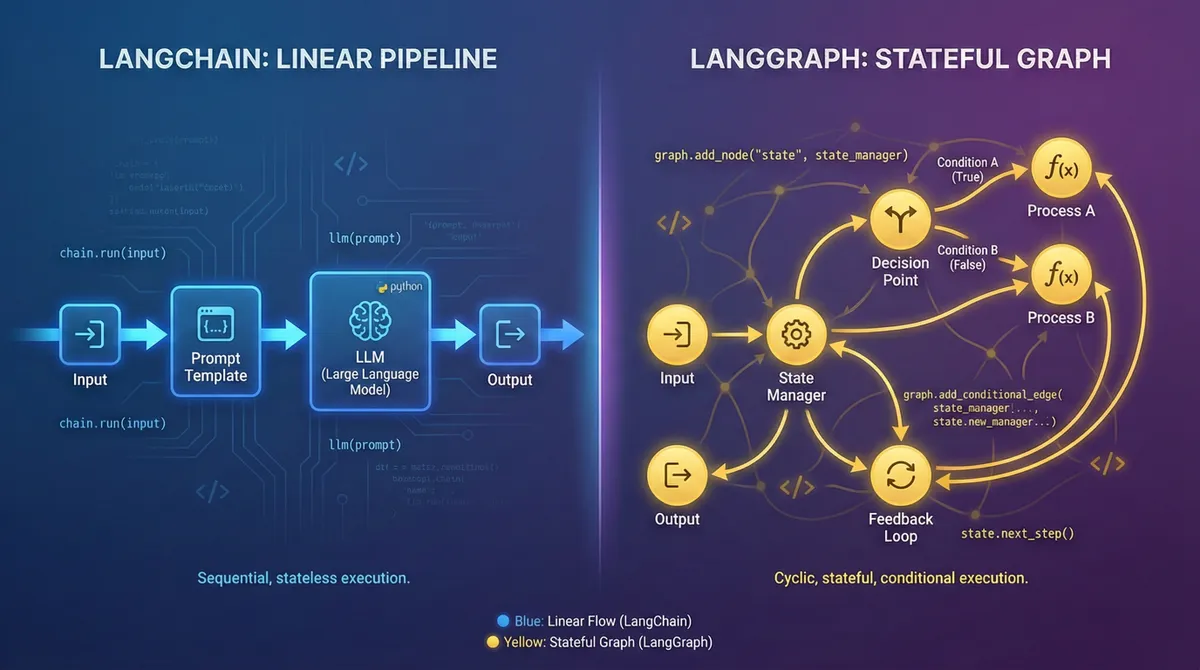
The fundamental distinction between LangChain and LangGraph isn’t just about features, but it’s about their core execution models.
LangChain: The Pipeline Architect
LangChain models workflows as directed acyclic graphs (DAGs)—essentially one-way streets with no loops. Think of it as an assembly line where each station processes the input and passes it to the next station. Once you reach the end, you’re done.
This linear execution model is perfect for straightforward tasks like:
- Document Q&A systems (RAG)
- Content summarization
- Data extraction pipelines
- Simple chatbots without complex state
Key characteristics:
- Stateless by default (each invocation is independent)
- Sequential execution (step A → B → C → end)
- Uses LCEL (LangChain Expression Language) for composing chains
- Quick prototyping and simple debugging
LangGraph: The State Machine Controller
LangGraph, released in early 2024, takes a fundamentally different approach. It models workflows as cyclic graphs with explicit state management. This means your workflow can loop, branch based on conditions, and maintain memory across multiple steps.
This graph-based architecture enables:
- Loops: Retry logic, iterative refinement, multi-step reasoning
- Conditional branching: Different paths based on runtime conditions
- Persistent state: Memory that survives across multiple invocations
- Human-in-the-loop: Pause execution for approval or input
Key characteristics:
- Stateful by design (maintains context across steps)
- Cyclic execution (can loop back to previous nodes)
- Built-in persistence and checkpointing
- Production-grade error handling and recovery
The Relationship Between Them
Here’s a crucial insight: LangGraph is built on top of LangChain. They’re not competitors—they’re complementary tools in your AI engineering toolkit.
- LangChain provides the components: document loaders, embeddings, vector stores, model interfaces
- LangGraph provides the orchestration: how those components interact, when to loop, how to maintain state
As of November 2025, both frameworks reached their 1.0 stable releases, marking them as production-ready with backward compatibility guarantees until 2.0.
The Decision Framework: When to Choose What
Let’s establish clear patterns for making this architectural decision.
Choose LangChain When…
1. Your workflow is naturally linear
If you can describe your task as “do A, then B, then C, and you’re done,” LangChain is your friend.
# Classic LangChain RAG pattern (Python, LangChain 1.0+)
from langchain_openai import ChatOpenAI, OpenAIEmbeddings
from langchain_community.vectorstores import FAISS
from langchain.chains import RetrievalQA
from langchain_community.document_loaders import TextLoader
from langchain.text_splitter import RecursiveCharacterTextSplitter

# Load and prepare documents
loader = TextLoader("company_docs.txt")
documents = loader.load()
text_splitter = RecursiveCharacterTextSplitter(chunk_size=1000)
docs = text_splitter.split_documents(documents)

# Create vector store
embeddings = OpenAIEmbeddings()
vectorstore = FAISS.from_documents(docs, embeddings)

# Build the chain
llm = ChatOpenAI(model="gpt-4", temperature=0)
qa_chain = RetrievalQA.from_chain_type(
    llm=llm,
    retriever=vectorstore.as_retriever()
)

# Use it
result = qa_chain.invoke({"query": "What is our refund policy?"})
print(result["result"])
Use cases:
- Document Q&A systems (RAG)
- Content generation (blogs, emails, summaries)
- Data extraction from structured documents
- Simple customer support bots
- ETL pipelines with LLM processing
2. You’re prototyping quickly
LangChain’s higher-level abstractions let you build and iterate faster. The create_agent function (introduced in v1.0) makes agent creation trivial:
from langchain.agents import create_agent
from langchain_openai import ChatOpenAI
from langchain.tools import Tool

# Define your tools
tools = [
    Tool(
        name="Calculator",
        func=lambda x: eval(x),  # Don't use eval in production!
        description="Performs mathematical calculations"
    )
]

# Create agent in one line
agent = create_agent(
    model="gpt-4",
    tools=tools
)

# Run it
response = agent.invoke({"input": "What is 25 * 17?"})
3. State management isn’t critical
If each user interaction is independent and you don’t need memory across sessions, LangChain’s stateless nature is actually a feature, not a limitation.
Choose LangGraph When…
1. You need loops or conditional logic
If your workflow requires “do X until Y happens” or “if condition A, go to step B, else go to step C,” you need LangGraph.
# LangGraph conditional routing example (Python, LangGraph 1.0+)
from typing import TypedDict, Literal
from langgraph.graph import StateGraph, END
from langchain_openai import ChatOpenAI

# Define state schema
class ResearchState(TypedDict):
    query: str
    research_data: list[str]
    confidence_score: float
    iterations: int

# Initialize LLM
llm = ChatOpenAI(model="gpt-4", temperature=0)

# Define nodes
def research_node(state: ResearchState):
    """Conduct research on the query."""
    # Simulate research
    new_data = f"Research finding from iteration {state['iterations']}"
    return {
        "research_data": state["research_data"] + [new_data],
        "confidence_score": 0.6 + (state["iterations"] * 0.15),
        "iterations": state["iterations"] + 1
    }

def decision_node(state: ResearchState) -> Literal["continue_research", "generate_response"]:
    """Decide whether to continue researching or generate final response."""
    if state["confidence_score"] >= 0.8 or state["iterations"] >= 3:
        return "generate_response"
    return "continue_research"

def generate_node(state: ResearchState):
    """Generate final response based on research."""
    summary = "\n".join(state["research_data"])
    response = llm.invoke(f"Summarize: {summary}")
    return {"research_data": state["research_data"] + [response.content]}

# Build the graph
graph = StateGraph(ResearchState)

# Add nodes
graph.add_node("research", research_node)
graph.add_node("generate", generate_node)

# Add edges
graph.set_entry_point("research")
graph.add_conditional_edges(
    "research",
    decision_node,
    {
        "continue_research": "research",  # Loop back
        "generate_response": "generate"
    }
)
graph.add_edge("generate", END)

# Compile and run
app = graph.compile()
result = app.invoke({
    "query": "Latest AI trends",
    "research_data": [],
    "confidence_score": 0.0,
    "iterations": 0
})
Use cases:
- Multi-step agents that refine their approach iteratively
- Systems requiring retry logic with backoff
- Workflows with approval gates (human-in-the-loop)
- Complex decision trees with multiple branches
2. You need durable execution and persistence
LangGraph automatically checkpoints state after each step. If your server crashes mid-workflow, it can resume exactly where it left off.
# LangGraph with checkpointing (Python)
from langgraph.checkpoint.memory import MemorySaver

# Add checkpointer for persistence
memory = MemorySaver()
app = graph.compile(checkpointer=memory)

# Run with thread ID for persistence
config = {"configurable": {"thread_id": "user-123"}}
result = app.invoke(initial_state, config)

# Later, resume from where it left off
continued = app.invoke({"additional_input": "data"}, config)
Use cases:
- Long-running background jobs (hours or days)
- Multi-day approval workflows
- Research agents that span multiple sessions
- Any process that must survive server restarts
3. You need human-in-the-loop patterns
LangGraph provides first-class support for pausing execution and waiting for human input or approval.
# Human-in-the-loop with LangGraph (simplified example)
from langgraph.checkpoint.memory import MemorySaver
from langgraph.pregel import interrupt

def approval_node(state):
    """Pause for human approval."""
    # This will pause execution here
    user_decision = interrupt("Please approve this action")
    return {"approved": user_decision == "yes"}

graph.add_node("approval", approval_node)
Use cases:
- Content moderation workflows
- Financial transaction approvals
- Medical decision support systems
- Any high-stakes decision requiring human oversight
4. You’re building multi-agent systems
LangGraph excels at coordinating multiple specialized agents that work together.
# Multi-agent pattern with LangGraph (conceptual)
from langgraph.graph import StateGraph

# Define specialized agents
def research_agent(state): ...
def code_agent(state): ...
def writing_agent(state): ...
def supervisor_agent(state): ...  # Routes to specialists

graph = StateGraph(MultiAgentState)
graph.add_node("supervisor", supervisor_agent)
graph.add_node("researcher", research_agent)
graph.add_node("coder", code_agent)
graph.add_node("writer", writing_agent)

# Supervisor routes to appropriate agent
graph.add_conditional_edges("supervisor", route_to_agent)
Use cases:
- Enterprise AI assistants with specialized capabilities
- Software development copilots
- Research systems combining multiple data sources
- Customer service platforms with escalation paths
Production Patterns and Real-World Examples
Let’s examine how major companies are using these frameworks in production.
Pattern 1: Start with LangChain, Upgrade to LangGraph
The Strategy: Most production systems start with LangChain to validate the concept, then migrate specific workflows to LangGraph as complexity grows.
# Phase 1: LangChain for initial MVP (RAG chatbot)
from langchain.chains import RetrievalQA

qa_chain = RetrievalQA.from_chain_type(
    llm=llm,
    retriever=vectorstore.as_retriever()
)

# Phase 2: Add LangGraph when you need retry logic
from langgraph.graph import StateGraph

class EnhancedState(TypedDict):
    query: str
    retrieved_docs: list
    attempts: int
    final_answer: str

def retrieve_with_retry(state: EnhancedState):
    """Retrieve documents with automatic retry on low confidence."""
    docs = vectorstore.similarity_search(state["query"])
    if len(docs) < 2 and state["attempts"] < 3:
        return {"attempts": state["attempts"] + 1}  # Trigger retry
    return {"retrieved_docs": docs}
Real-world example: Uber automated unit test generation using LangGraph, reducing development time while improving code quality through iterative refinement loops.
Pattern 2: Hybrid Architecture
The Strategy: Use LangChain components inside LangGraph workflows for best of both worlds.
# Using LangChain components within LangGraph nodes
from langchain_openai import ChatOpenAI
from langchain.tools import Tool
from langgraph.graph import StateGraph

# LangChain components
llm = ChatOpenAI(model="gpt-4")
tools = [
    Tool(name="web_search", func=web_search_function, description="..."),
    Tool(name="calculator", func=calculator_function, description="...")
]

# LangGraph orchestration
def agent_node(state):
    """Use LangChain tools within LangGraph node."""
    result = llm.invoke(state["messages"], tools=tools)
    return {"messages": state["messages"] + [result]}

graph = StateGraph(AgentState)
graph.add_node("agent", agent_node)
Real-world example: Klarna uses this pattern to power their customer support bot for 85 million active users, combining LangChain’s tool ecosystem with LangGraph’s robust orchestration.
Pattern 3: Document Processing Pipeline
Use LangChain for: When documents follow a predictable processing path.
# Document processing with LangChain (Python)
from langchain.chains import create_extraction_chain
from langchain_openai import ChatOpenAI

# Schema for extraction
schema = {
    "properties": {
        "invoice_number": {"type": "string"},
        "amount": {"type": "number"},
        "date": {"type": "string"},
    },
    "required": ["invoice_number", "amount"],
}

# Create extraction chain
llm = ChatOpenAI(model="gpt-4", temperature=0)
chain = create_extraction_chain(schema, llm)

# Process document
result = chain.invoke({"input": document_text})
When to upgrade to LangGraph: When you need validation loops, data quality checks, or handling of edge cases.
Common Pitfalls and Troubleshooting
Pitfall 1: Using LangChain for Stateful Workflows
Problem: Trying to implement loops or complex state management in LangChain leads to messy, unmaintainable code.
Symptom: Your code is full of while loops, manual state tracking, and fragile retry logic.
Solution: Migrate to LangGraph. Loops and state are first-class citizens there.
# ❌ Bad: Attempting loops in LangChain
attempts = 0
while attempts < 3:
    result = chain.invoke(input)
    if validate(result):
        break
    attempts += 1

# ✅ Good: Natural loops in LangGraph
def should_continue(state) -> Literal["continue", "end"]:
    return "continue" if state["attempts"] < 3 else "end"

graph.add_conditional_edges("process", should_continue)
Pitfall 2: Overengineering Simple Tasks with LangGraph
Problem: Using LangGraph’s complex graph structure for simple linear tasks adds unnecessary complexity.
Symptom: Your graph has no conditional edges, no loops, and executes linearly every time.
Solution: Use LangChain for linear workflows. Save LangGraph for when you actually need its power.
# ❌ Overkill: LangGraph for linear task
graph = StateGraph(State)
graph.add_node("step1", step1)
graph.add_node("step2", step2)
graph.add_edge("step1", "step2")  # Always goes step1 → step2

# ✅ Better: LangChain LCEL for linear chains
from langchain_core.runnables import RunnableLambda

chain = RunnableLambda(step1) | RunnableLambda(step2)
result = chain.invoke(input)
Pitfall 3: Missing Context in Async Workflows
Problem: When using async operations, OpenTelemetry tracing context gets lost, making debugging impossible.
Symptom: Disconnected spans in your traces, or entire operations missing from observability.
Solution: Properly propagate context in async tasks.
# ❌ Context lost in async operations
import asyncio

async def process_documents(documents):
    tasks = [process_single_doc(doc) for doc in documents]
    return await asyncio.gather(*tasks)  # Context lost!

# ✅ Context preserved
from opentelemetry import context

async def process_documents(documents):
    current_context = context.get_current()
    tasks = [
        context.attach(current_context) and process_single_doc(doc)
        for doc in documents
    ]
    return await asyncio.gather(*tasks)
Pitfall 4: Invalid State Updates in LangGraph
Problem: Multiple nodes trying to update the same state key without a reducer function.
Symptom: InvalidUpdateError exceptions halting your graph.
Solution: Define reducer functions for keys that multiple nodes update.
# ❌ Causes InvalidUpdateError
class State(TypedDict):
    items: list[str]  # Multiple nodes append here → conflict!

# ✅ Use a reducer
from operator import add
from typing import Annotated

class State(TypedDict):
    items: Annotated[list[str], add]  # 'add' reducer merges lists
Pitfall 5: Infinite Loops Without Safeguards
Problem: Conditional edges with bugs cause infinite loops.
Symptom: GraphRecursionError when exceeding recursion limits.
Solution: Always include maximum iteration counts and explicit exit conditions.
# ✅ Safe loop with iteration limit
class State(TypedDict):
    iterations: int
    max_iterations: int

def should_continue(state) -> Literal["continue", "end"]:
    if state["iterations"] >= state["max_iterations"]:
        return "end"
    # Your other conditions...
    return "continue" if needs_more_work else "end"
Decision Checklist: Quick Reference
Use this checklist when architecting your next AI application:
Choose LangChain if:
- ✅ Workflow is linear (A → B → C → done)
- ✅ No state needed between invocations
- ✅ Prototyping or MVP phase
- ✅ Simple RAG or document Q&A
- ✅ One-shot processing tasks
- ✅ Low complexity, high velocity iteration
Choose LangGraph if:
- ✅ Need loops or conditional branching
- ✅ Require persistent state across steps
- ✅ Human-in-the-loop workflows
- ✅ Long-running tasks (hours/days)
- ✅ Multi-agent coordination
- ✅ Production-grade error recovery needed
- ✅ Complex decision trees
Migration triggers (move from LangChain → LangGraph):
- ⚠️ Adding retry logic or error handling feels hacky
- ⚠️ Need to pause workflow for approval
- ⚠️ State management becoming complex
- ⚠️ Workflow needs to span multiple sessions
- ⚠️ Conditional logic creating spaghetti code
Conclusion
The choice between LangChain and LangGraph isn’t about which framework is “better”—it’s about matching your workflow’s complexity to the right architectural pattern.
Key takeaways:
-
LangChain excels at linear workflows: Use it for RAG systems, content generation, and simple agents where each invocation is independent.
-
LangGraph handles complexity: Reach for it when you need loops, conditional branching, persistent state, or human-in-the-loop patterns.
-
They’re complementary, not competitive: Most production systems use both—LangChain components orchestrated by LangGraph’s state machine.
-
Start simple, evolve gradually: Begin with LangChain to validate your concept, then migrate specific workflows to LangGraph as complexity demands.
-
Both are production-ready: With v1.0 releases in November 2025, both frameworks offer stability guarantees and are trusted by companies like Uber, Klarna, and LinkedIn.
Next steps:
- Experiment with the code examples in this guide
- Try the LangChain Academy’s free course on LangGraph fundamentals
- Review the official migration guide for moving from LangChain to LangGraph
- Join the LangChain Forum to learn from community patterns
Remember: the best framework is the one that matches your problem’s inherent complexity. Don’t overthink it—start building, measure results, and refactor when the pain points become clear.
References:
- LangChain Official Documentation - https://docs.langchain.com - Comprehensive API reference and conceptual guides for both frameworks
- LangGraph 1.0 Release Announcement - https://blog.langchain.com/langchain-langgraph-1dot0/ - Details on v1.0 features and stability guarantees (November 2025)
- Building LangGraph from First Principles - https://blog.langchain.com/building-langgraph/ - Design philosophy and production requirements (October 2025)
- LangGraph GitHub Repository - https://github.com/langchain-ai/langgraph - Open-source codebase with examples and issue tracker (latest: v1.0.9, February 2026)
- LangChain vs LangGraph Technical Guide - https://myengineeringpath.dev/tools/langchain-vs-langgraph/ - Production failure modes and migration strategies (February 2026)
- DataCamp LangChain Ecosystem Comparison - https://www.datacamp.com/tutorial/langchain-vs-langgraph-vs-langsmith-vs-langflow - Complete ecosystem overview including LangSmith and LangFlow (September 2025)